> ## Documentation Index
> Fetch the complete documentation index at: https://docs.pathors.com/llms.txt
> Use this file to discover all available pages before exploring further.

# 聊天整合快速入門指南

> 學習如何快速設置和使用Pathors的聊天整合功能

## 概述

本指南將幫助您快速設置和使用 Pathors 的聊天功能，幫助你將聊天視窗嵌入於個人網頁中。

## 前置條件

* Pathors 帳號

## 詳細步驟

### 步驟 1：設置 Pathors 整合

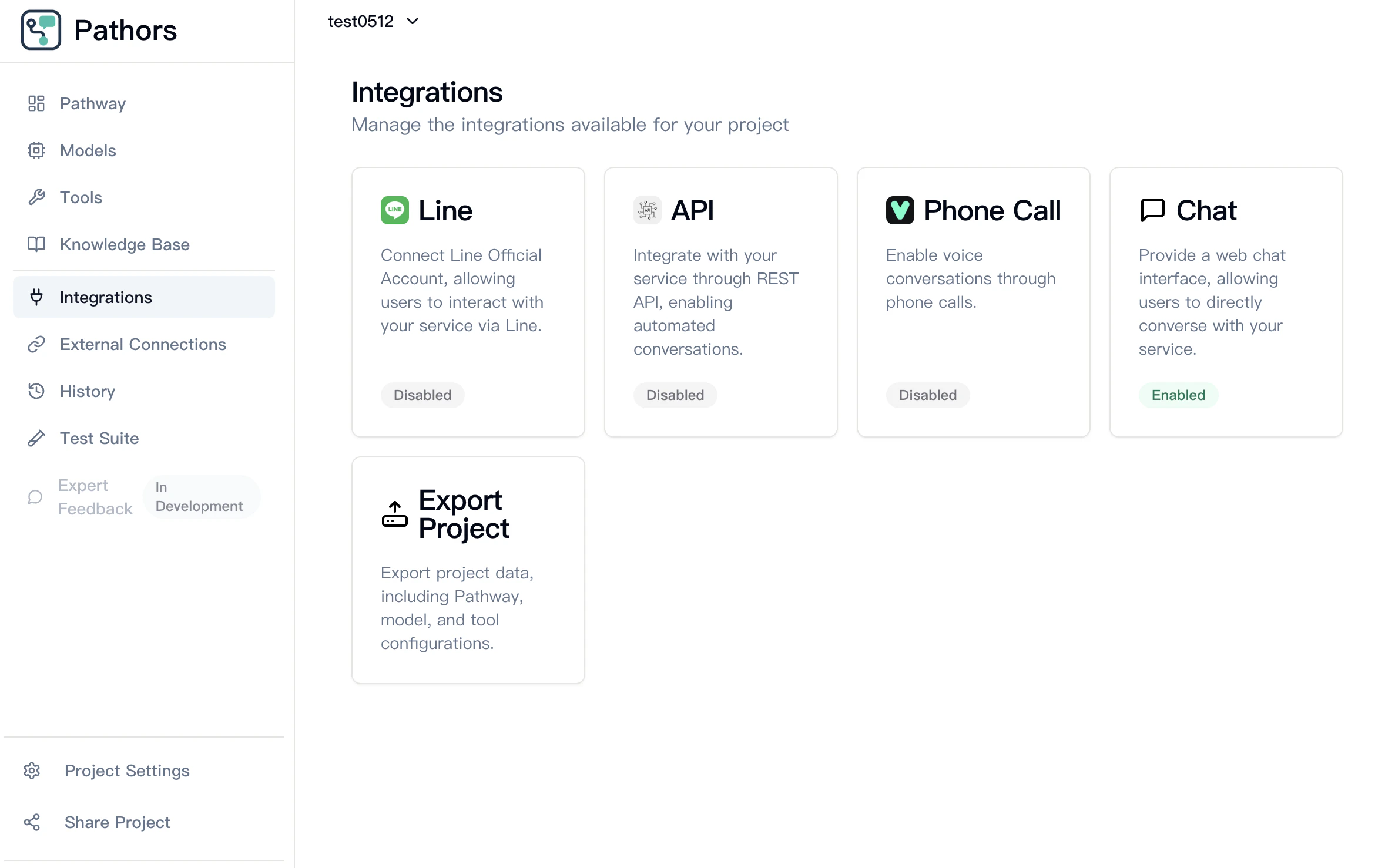
1. 打開 Pathors 控制台
2. 導航至整合頁面
3. 選擇 Chat 整合選項
<Frame>
  <img src="https://mintcdn.com/pathorstechnology/KdB-f_Xl4XvHDQAi/images/chat/step1-go-to-pathors-integration-page-select-chat.png?fit=max&auto=format&n=KdB-f_Xl4XvHDQAi&q=85&s=023076347e9f956f7e539e378a31ac46" alt="" width="2374" height="1478" data-path="images/chat/step1-go-to-pathors-integration-page-select-chat.png" />
</Frame>

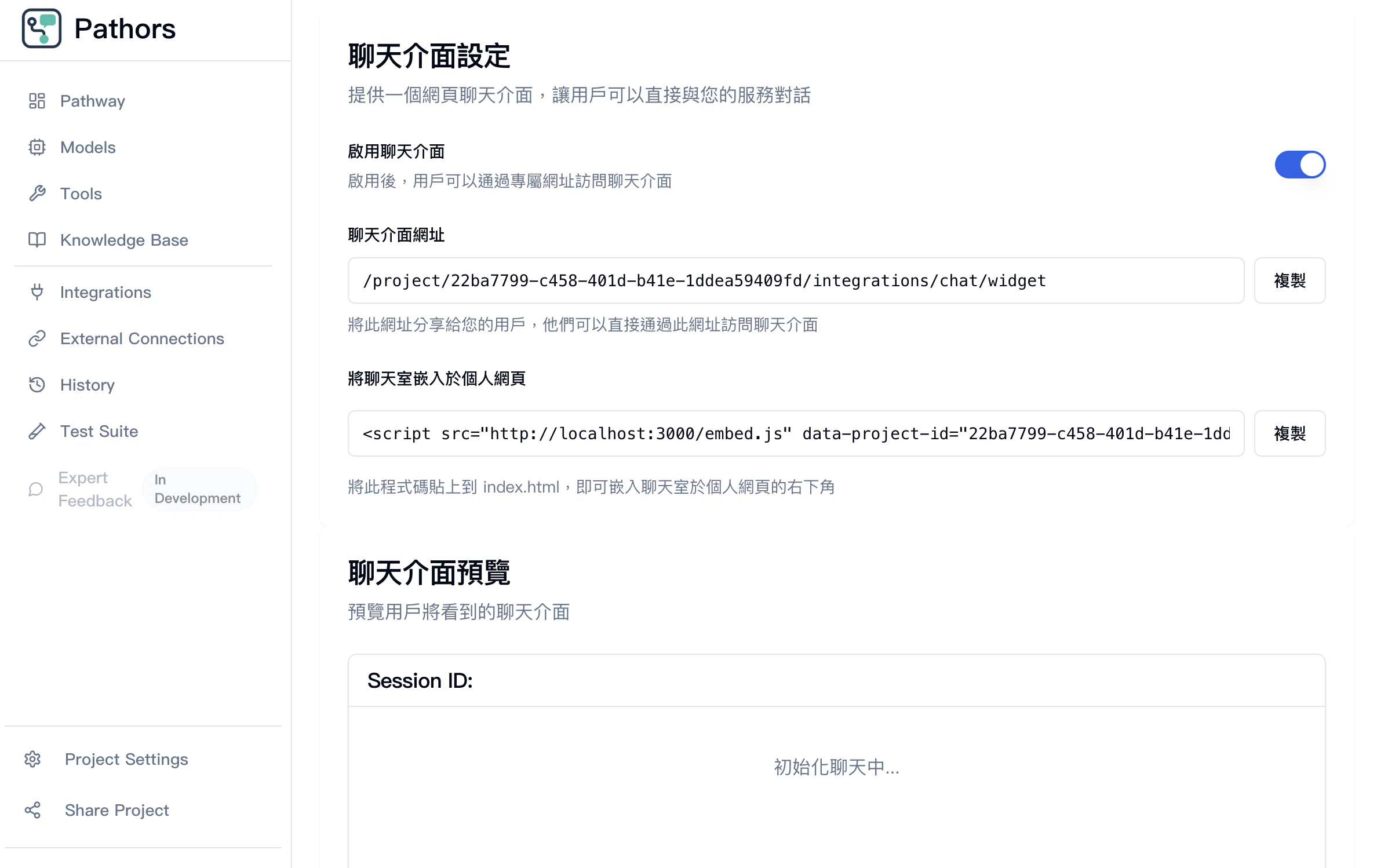
### 步驟 2：複製「將聊天室嵌入於個人網頁中」的代碼

1. 點選右側複製按鈕複製代碼

<Frame>
  <img src="https://mintcdn.com/pathorstechnology/KdB-f_Xl4XvHDQAi/images/chat/step2-enable-chat-integration-and-copy-embed-script.png?fit=max&auto=format&n=KdB-f_Xl4XvHDQAi&q=85&s=874d7c1cabdb2c0f53ba0188c32babfb" alt="" width="2376" height="1498" data-path="images/chat/step2-enable-chat-integration-and-copy-embed-script.png" />
</Frame>

### 步驟 3: 打開個人網頁並貼上代碼

**注意**：若您使用 Next.js 撰寫程式，您將會需要更改代碼標籤為 React 內建的 `<Script>` 標籤

1. 打開您的程式，並於 index.html 當中貼上複製的代碼

<Frame>
  <img src="https://mintcdn.com/pathorstechnology/KdB-f_Xl4XvHDQAi/images/chat/step3-copy-script-code-to-file.png?fit=max&auto=format&n=KdB-f_Xl4XvHDQAi&q=85&s=d9ebb73188bf179d3784901814dc06fd" alt="" width="1924" height="652" data-path="images/chat/step3-copy-script-code-to-file.png" />
</Frame>

### 步驟 4：重啟您的網頁

1. 運行您的程式
2. 若網站運作正常，將會於右下角顯示聊天室圖樣

<Frame>
  <img src="https://mintcdn.com/pathorstechnology/KdB-f_Xl4XvHDQAi/images/chat/step4-paste-script-into-website-and-open.png?fit=max&auto=format&n=KdB-f_Xl4XvHDQAi&q=85&s=2fae316d4a52017c79b31c3fd5166d71" alt="" width="2048" height="1464" data-path="images/chat/step4-paste-script-into-website-and-open.png" />
</Frame>

### 步驟 5：打開聊天室圖樣，即可打開聊天視窗並使用

<Frame>
  <img src="https://mintcdn.com/pathorstechnology/KdB-f_Xl4XvHDQAi/images/chat/step5-click-on-chat-bubble.png?fit=max&auto=format&n=KdB-f_Xl4XvHDQAi&q=85&s=7ddb02a977fad244d8c759ab078f4f5a" alt="" width="2364" height="1696" data-path="images/chat/step5-click-on-chat-bubble.png" />
</Frame>